Generated Code
WaveMaker enables developers to import third-party APIs and automatically generate a fully functional backend, including Java classes, service logic, and design-time configurations. It follows proven enterprise patterns built on Java, Spring, and Hibernate/JPA. This makes it easy to quickly integrate and customize APIs.
Developers have complete access to the generated source code and can confidently extend or customize it without affecting future platform upgrades.
Backend Architecture
This section describes the structure of a WaveMaker-generated service, using the Random User as an example. The same structure and patterns apply to all other third-party APIs imported into WaveMaker.
WaveMaker services represent fully integrated backend components, including design-time configuration, generated Java code, and runtime metadata.
- Developers import a Swagger/OpenAPI specification (JSON/YAML) that defines API endpoints, request/response structures, parameters, and authentication requirements.
- WaveMaker interprets this spec to understand the API’s structure and available operations.
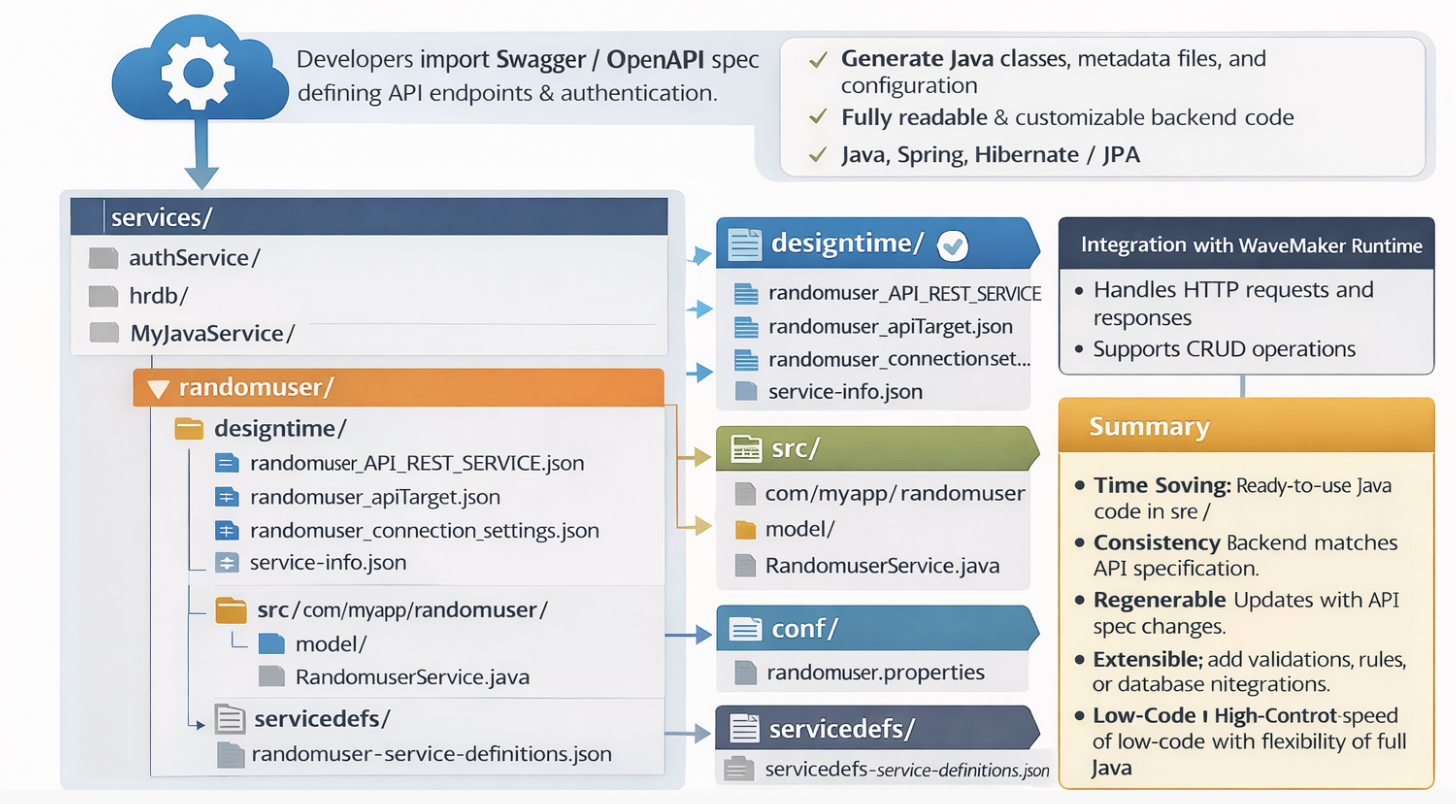
Folder Structure
services/
├── authService/
├── hrdb/
├── MyJavaService/
└── randomuser/
    ├── designtime/
    │   ├── randomuser_API_REST_SERVICE.json
    │   ├── randomuser_apiTarget.json
    │   ├── randomuser_connection_settings.json
    │   └── service-info.json
    ├── src/
    │   └── com/
    │       └── myapp/
    │           └── randomuser/
    │               ├── model/
    │               └── service/
    │                   └── RandomuserService.java
    ├── conf/
    │   └── randomuser.properties
    └── servicedefs/
        └── randomuser-service-definitions.json
services/
- Root folder for all backend services in the project.
- Each subfolder represents a service, e.g.,
authService,hrdb,MyJavaService,randomuser.
randomuser/
Main folder for the randomuser service, containing both design-time configuration and generated backend code.
a. designtime/
Holds JSON configuration files used by WaveMaker at design-time (in Studio):
randomuser_API_REST_SERVICE.json– Defines API endpoints, request/response models, and mappings.randomuser_apiTarget.json– Contains target configuration for connecting to the API (base URLs, endpoints).randomuser_connection_settings.json– Stores connection/authentication settings for the API.service-info.json– Metadata about the service such as name, type, and version.
b. src/com/myapp/randomuser/
Java source code generated for the service:
model/– Java classes representing API data structures (request/response objects).service/– Service classes implementing logic to call the API.RandomuserService.java– Main service class handling API calls and integrating with business logic.
c. conf/
Configuration files for the service at runtime:
randomuser.properties– Holds runtime properties such as API endpoints and authentication tokens.
d. servicedefs/
Holds service definition JSONs used for WaveMaker Studio and deployment:
randomuser-service-definitions.json– Defines all available service methods, parameters, and data structures.
Key Points
- WaveMaker generates fully readable Java code in
src/. designtime/andservicedefs/are used internally by WaveMaker Studio for API integration and should not be deleted.- Properties in
conf/allow runtime customization without changing code. - The structure allows seamless integration of third-party APIs.
Integration with WaveMaker Runtime
- The generated backend integrates with WaveMaker runtime automatically:
- Handles HTTP requests and responses
- Supports CRUD operations
- Allows addition of custom business logic
- APIs can be tested immediately.
Application Configuration Properties
Whenever services are imported into WaveMaker, the platform automatically generates configuration properties that can be mapped to different environments such as Development, QA, or Production.
You can view and manage these properties in the Profiles.
For more information, refer to the Profiles section in the documentation.
For more details on environment-specific configurations, refer to the Profile Settings section.
Click to expand configuration properties
# ---------------------------
# WebSocket Configuration
# ---------------------------
websocket.websocket.basepath=
websocket.websocket.host=echo.websocket.org
websocket.websocket.scheme=wss

# ---------------------------
# OAuth2 (Swagger Petstore) Configuration
# ---------------------------
oauth2.swagger_petstore_auth.accessTokenUrl=
oauth2.swagger_petstore_auth.authorizationUrl=https://petstore.swagger.io/oauth/authorize
oauth2.swagger_petstore_auth.clientId=
oauth2.swagger_petstore_auth.clientSecret=
oauth2.swagger_petstore_auth.isPkceRequired=false
oauth2.swagger_petstore_auth.oauth2Flow=IMPLICIT

## Swagger API
rest.swagger.apikey.header.api_key=
rest.swagger.basepath=/v2
rest.swagger.host=petstore.swagger.io
rest.swagger.scheme=https

# ---------------------------
# REST API Configurations
# ---------------------------

## Random User API
rest.randomuser.basepath=
rest.randomuser.host=randomuser.me
rest.randomuser.scheme=https


## WaveMaker Online Services
rest.wavemakeronline.basepath=/pk9yct3s6nqt/MyApp/services
rest.wavemakeronline.host=https://cloud.wavemakeronline.com
rest.wavemakeronline.scheme=https
Summary
- Time-Saving: No need to manually write models or service stubs.
- Consistency: Backend matches API specification perfectly.
- Regenerable: Backend can be updated if the API spec changes.
- Extensible: Add validations, business rules, or database integrations.
- Low-Code + High-Control: Speed of low-code with flexibility of full Java. This process ensures a robust, maintainable, and scalable backend that aligns perfectly with the API specification.