Open API - Swagger
WaveMaker provides built-in support for importing REST APIs defined using Swagger/OpenAPI specifications (JSON or YAML), allowing developers to quickly integrate external services into their applications. When an API is imported, WaveMaker automatically generates the required backend service definitions and data models.
In WaveMaker, variables act as an abstraction over these generated services, handling request execution and response processing. This enables developers to bind API data directly to UI components without dealing with low-level service calls or backend implementation details. Learn more about Variables
API Workspace
WaveMaker provides a dedicated API Workspace that serves as the central hub for all API-related activities.
From the API Workspace, you can:
- Connect to third-party APIs
- Browse endpoints, request/response models, and parameters
- Import API specifications (Swagger/OpenAPI)
- Automatically generate services and data models
A short video in this section walks through the API Workspace UI and demonstrates how developers can visually explore and integrate APIs.
Learn more: API Explorer
Importing a Swagger/OpenAPI Definition
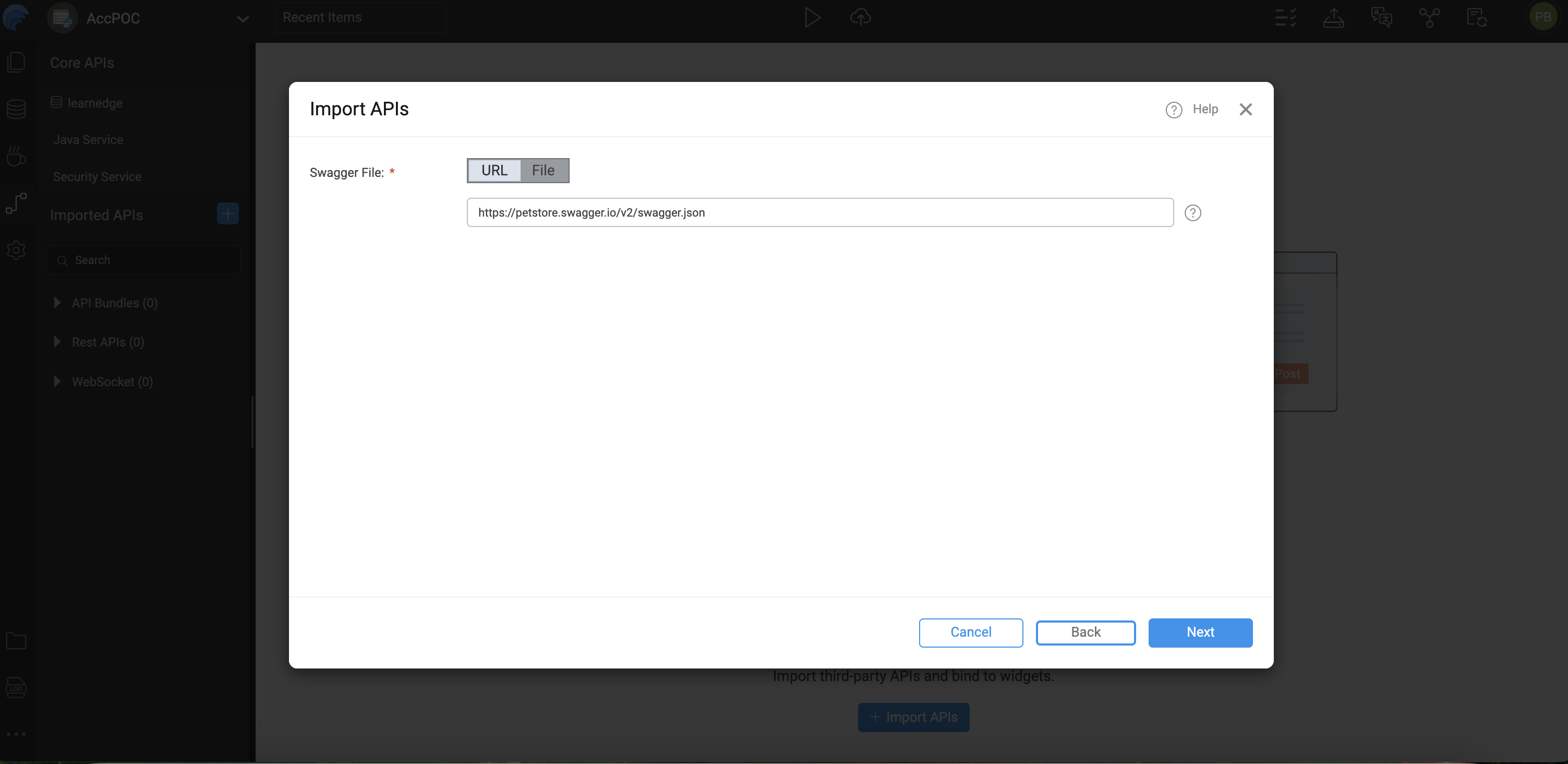
External REST APIs can be integrated into a WaveMaker project using the Imported APIs feature in WaveMaker Studio.
- Supports importing APIs defined using Swagger/OpenAPI specifications
- API definitions can be sourced from a local file or a hosted URL
- Both JSON and YAML formats are supported
- Imported APIs are processed and made available for use within the application
For example, to import the public Petstore API:
https://petstore.swagger.io/v2/swagger.json
Entities and Endpoints
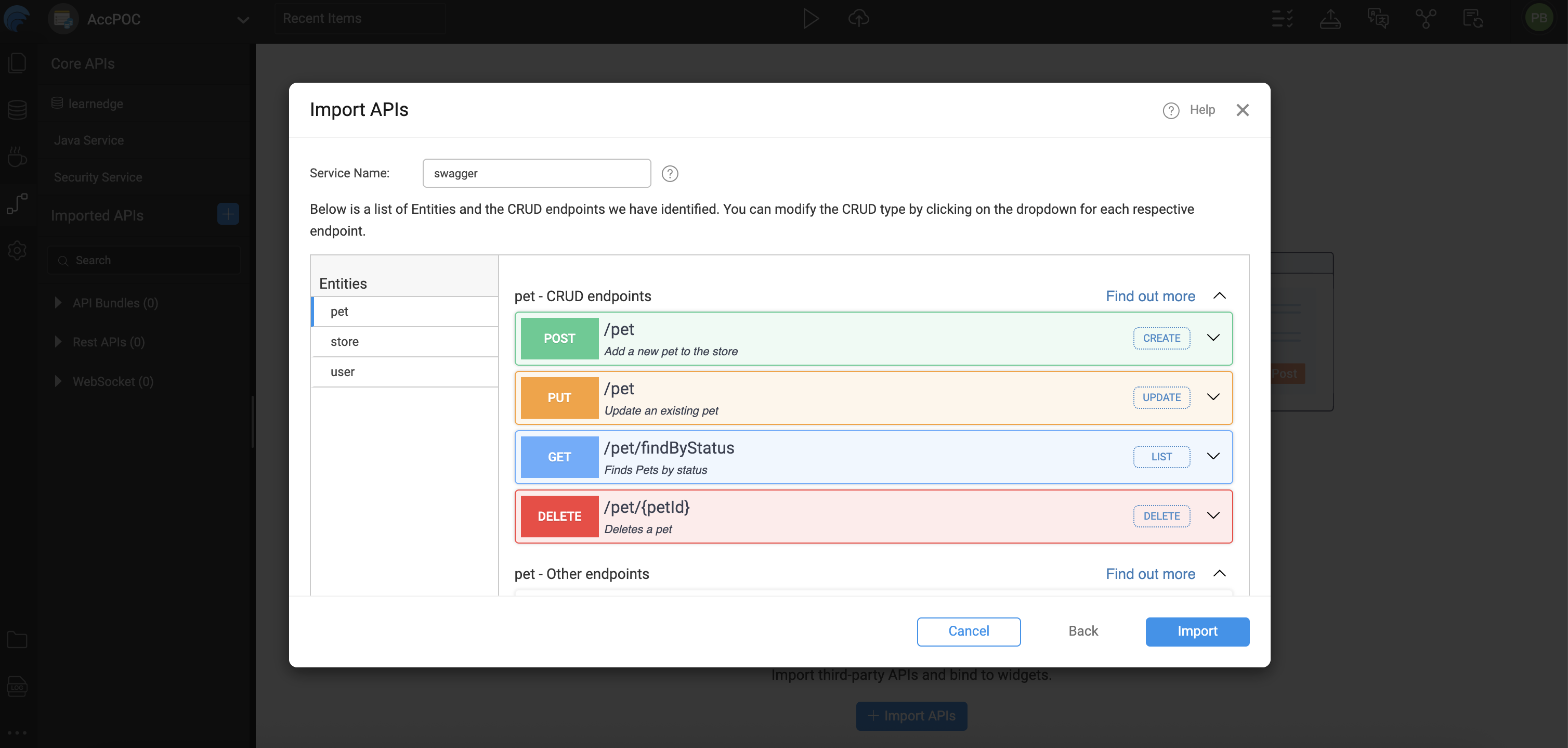
After importing the OpenAPI (Swagger) definition, WaveMaker analyzes the API structure and organizes endpoints into Entities. This entity-based representation helps map backend resources in a way that can be directly consumed by WaveMaker components.
- Entities represent logical business resources exposed by the API (for example, Users, Orders, or Products).
- Each entity groups all related endpoints belonging to the same resource.
- This structured grouping simplifies API discovery and improves reusability across the application.
Endpoint to Operation Mapping
WaveMaker automatically detects common CRUD-style endpoints and maps them to standardized operations. This enables seamless binding with UI components such as Live Forms, Data Tables, and Lists.
| HTTP Method | Operation | Swagger Mapping |
|---|---|---|
| POST | Create | CREATE |
| GET | Read/List | LIST |
| PUT | Update | UPDATE |
| DELETE | Delete | DELETE |
- Endpoints that do not follow standard CRUD conventions are categorized as custom operations within the same entity.
- This entity mapping enables seamless consumption of API data by WaveMaker UI components using standardized operations.
Configuring API Authentication
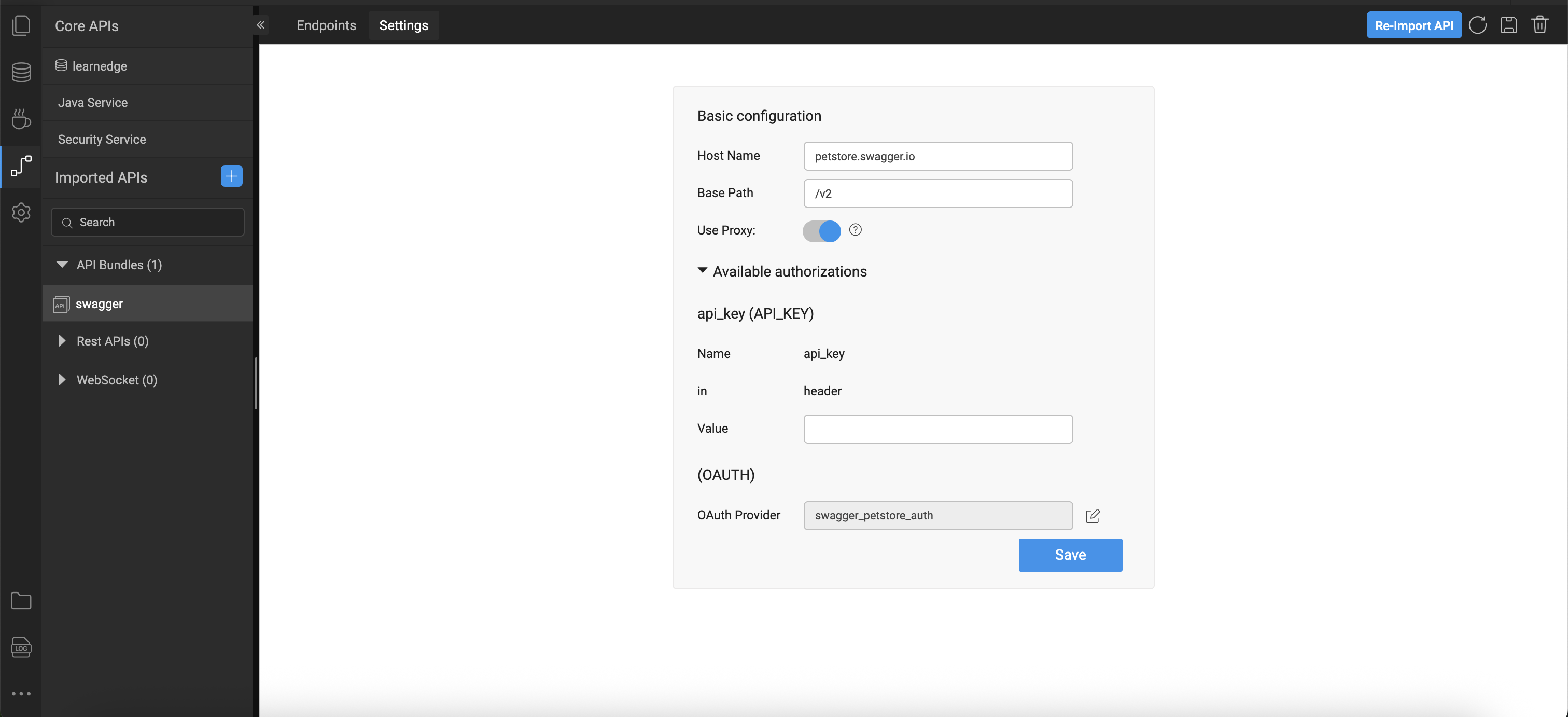
Once the Swagger API is selected and its metadata is verified:
- You can configure authentication for the API.
- Swagger definitions may include support for OAuth 2.0.
- If OAuth is required, click OAuth Provider in the import dialog and enter the relevant values such as:
- Access Token URL
- Client ID
- Client Secret
Authentication settings allow WaveMaker to communicate securely with protected APIs. For more detailed steps on configuring OAuth providers, refer to the OAuth Provider Configuration
For more understanding on configuring proxy, refer Proxy
Generated Code
WaveMaker allows developers to import third-party APIs and automatically generate a complete backend, including Java classes, service logic, and design-time configurations. Built on proven enterprise frameworks, this approach simplifies API integration and customization.
This section describes the structure of a WaveMaker-generated service, using the Pet Store as an example.
Folder Structure
services/
├── authService/
├── hrdb/
├── MyJavaService/
└── swagger/
    ├── designtime/
    │   ├── service-info.json
    │   ├── swagger_API_REST_SERVICE.json
    │   ├── swagger_apiTarget.json
    │   ├── swagger_connection_settings.json
    │   └── swagger_original_spec.json
    ├── src/
    │   └── com/
    │       └── wavemaker/
    │           └── myapp1/
    │               └── swagger/
    │                   ├── model/
    │                   │   ├── Category.java
    │                   │   ├── ModelApiResponse.java
    │                   │   ├── Order.java
    │                   │   ├── Pet.java
    │                   │   ├── PetIdUploadImageBody.java
    │                   │   ├── PetPetIdBody.java
    │                   │   ├── Tag.java
    │                   │   └── User.java
    │                   └── service/
    │                       ├── PetService.java
    │                       ├── StoreService.java
    │                       └── UserService.java
    ├── servicedefs/
    │   └── swagger-service-definitions.json
    ├── service_swagger.spring.xml
    └── swagger_apiTarget.json
services/
The services directory is the root container for all backend services in a WaveMaker application.
Each subfolder represents a distinct service type, such as database services, Java services, REST services, or Swagger / OpenAPI integrations.
This structure keeps backend logic modular, organized, and scalable.
swagger/
The swagger folder represents a backend service generated from a Swagger / OpenAPI specification.
WaveMaker consumes the specification and automatically generates configuration, Java models, service classes, and runtime wiring—enabling quick and transparent integration with external APIs.
Design-Time Configuration (designtime/)
Contains configuration files managed by WaveMaker Studio during Swagger import.
These files define how the Swagger service is configured and exposed within the platform.
Key files:
swagger_API_REST_SERVICE.json– Endpoint and operation metadataswagger_apiTarget.json– Base URLs and target mappingsswagger_connection_settings.json– Authentication and connection settingsswagger_original_spec.json– Original Swagger/OpenAPI specificationservice-info.json– Service metadata
⚠️ Platform-managed files — do not modify manually.
Generated Code (src/)
Contains generated, readable, and extensible Java code derived from the Swagger definition.
model/– POJOs representing request and response payloadsservice/– Java service classes that encapsulate REST calls and response handling
These classes can be safely used in custom business logic.
Service Definitions (servicedefs/)
swagger-service-definitions.json
Defines available service operations, input/output types, and mappings between design-time configuration and runtime execution.
Spring Configuration
service_swagger.spring.xml
Spring configuration used to wire the Swagger service at runtime, ensuring proper dependency injection and secure invocation.
Application Configuration Properties
Whenever services are imported into WaveMaker, the platform automatically generates configuration properties that can be mapped to different environments such as Development, QA, or Production.
You can view and manage these properties in the Profiles.
For more information, refer to the Profiles section in the documentation.
For more details on environment-specific configurations, refer to the Profiles Settings section.
Click to expand configuration properties
# ---------------------------
# OAuth2 (Swagger Petstore) Configuration
# ---------------------------
oauth2.swagger_petstore_auth.accessTokenUrl=
oauth2.swagger_petstore_auth.authorizationUrl=https://petstore.swagger.io/oauth/authorize
oauth2.swagger_petstore_auth.clientId=
oauth2.swagger_petstore_auth.clientSecret=
oauth2.swagger_petstore_auth.isPkceRequired=false
oauth2.swagger_petstore_auth.oauth2Flow=IMPLICIT

## Swagger API
rest.swagger.apikey.header.api_key=
rest.swagger.basepath=/v2
rest.swagger.host=petstore.swagger.io
rest.swagger.scheme=https
Summary
Importing Swagger/OpenAPI definitions in WaveMaker allows you to:
- Bring external REST APIs into your application with minimal effort.
- Configure authentication and secure API access.
- Use CRUD and service variables to integrate REST operations into your pages and components.
- Accelerate development by leveraging standardized API descriptions.
This feature lets you combine the power of external services with WaveMaker's low-code UI and binding framework, enabling rapid development of data-driven applications.
Import APIs
Watch for a step-by-step guide on Importing Swagger APIs in WaveMaker App