MockingBird – Mock REST APIs
In real-world development, the backend is not always ready when frontend work begins. Waiting for APIs to be fully implemented can cause delays and slow down the development process.
This is where MockingBird, WaveMaker’s API mocking solution, comes in. It allows you to create and simulate REST APIs with realistic, live-like responses, enabling frontend development and testing to continue smoothly, even if the actual backend is still under development or temporarily unavailable.
Why Use MockingBird?
MockingBird is useful in the following scenarios:
- Frontend development needs to start before backend APIs are ready
- Backend APIs are unstable or frequently breaking
- Backend teams are working in different time zones
- UI testing requires consistent and predictable API responses
Key Features
- Mock REST APIs using OpenAPI/Swagger specifications
- Generate realistic mock responses automatically
- Switch easily between mocked and real APIs from WaveMaker Studio
- Smart data generation based on field data types
How MockingBird Works
In WaveMaker Studio, MockingBird can be enabled at the time of importing a REST API.
When enabled:
- WaveMaker creates a mock server for the imported API
- Incoming API requests are routed to the mock server
- MockingBird generates realistic responses based on the API contract
MockingBird intelligently understands hundreds of common data types, such as:
- First Name and Last Name
- Address and Zip Code
- Phone Numbers
- Credit Card Numbers
- Dates and Numeric Fields
This ensures that the mocked responses closely resemble real-world data.
Prerequisites
Before using MockingBird, ensure that:
- A valid OpenAPI/Swagger specification is available
- The API specification is successfully imported into WaveMaker Studio
Mocking Imported APIs in WaveMaker
To get started with MockingBird, begin by importing your REST API into WaveMaker Studio. Navigate to APIs → Import APIs and provide a valid Swagger/OpenAPI specification. Once the API is successfully imported, you can enable mocking to simulate API responses.
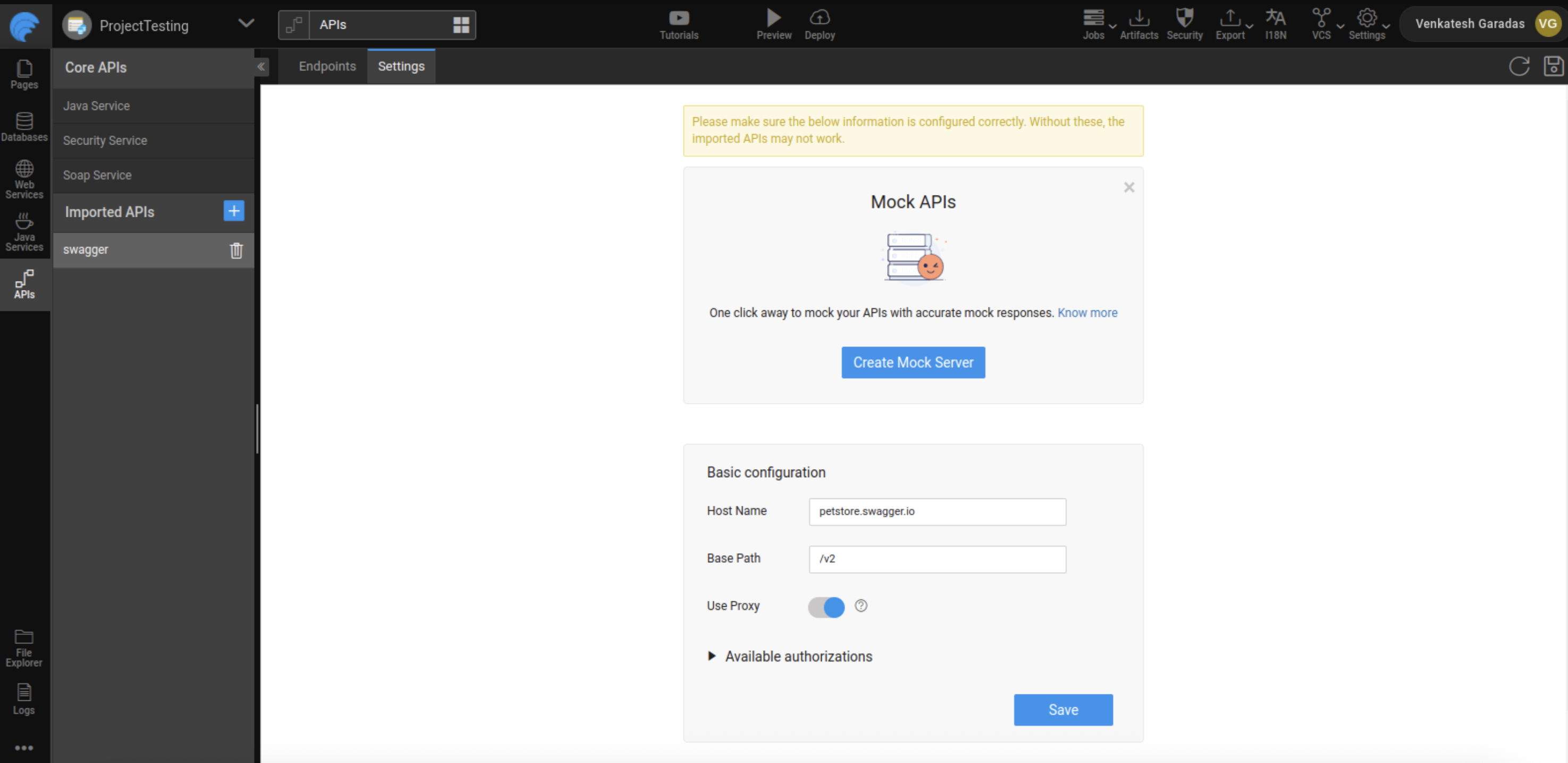
Next, go to APIs → API Resources and select the imported API you want to mock.
In the Settings tab, you’ll find the option to Create Mock Server. Clicking this will enable API mocking for the first time, allowing MockingBird to generate realistic responses. With the mock server in place, your frontend can interact with the API as if it were live, ensuring development and testing continue without waiting for the backend. Disabling it will disable your mock APIs
Once the mock server is created:
- A Mock tag appears next to the imported API
- All variables associated with this API point to the mocked service
Using Mocked APIs
After enabling MockingBird:
- API calls made from the application are served by the mock server
- Responses are generated dynamically based on the API contract
- No backend dependency is required during UI development or testing
Best Practices
- Enable MockingBird early during UI development
- Use mocked APIs for UI testing and demos
- Switch to real APIs during integration testing
- Validate API contracts carefully to ensure accurate mock responses
Summary
MockingBird simplifies frontend development by allowing developers to work with mocked REST APIs that behave like real services. With easy setup, intelligent data generation, and seamless switching between mocked and real APIs, MockingBird helps teams stay productive and maintain a smooth development flow in WaveMaker.