Configuration Profiles
Configuration Profiles in WaveMaker allow you to define environment-specific settings for your application, such as database connections, API endpoints, and other external service configurations. This ensures that the same application can run seamlessly across multiple environments (development, testing, staging, production) without changing the codebase.
You can configure a profile to provide lots of custom settings to suit third-party tools, services, network settings, or certificates, you can do it with the help of Config Profiles. This is in line with Maven Configuration Profiles.
Key Concepts
- Profile: A named set of configuration values that correspond to a specific environment.
- Environment Variables: Values like URLs, credentials, and file paths that vary between environments.
- Externalizable Properties: Application properties that can be parameterized in configuration profiles for easy switching between environments.
By using configuration profiles, developers can easily deploy the same application to different environments while maintaining consistent behavior.
Application Profiles
Every WaveMaker application includes at least two default profiles:
- Development – used when running the application from Studio
- Deployment – used when deploying the application
You can also create custom profiles for specific environments such as QA or Production.
All application configuration values are defined in a single base file, configurable.properties. This file contains the complete set of properties used by the application.
When a specific profile (Development, Deployment, or any custom profile) requires different values, only those overridden properties are defined in that profile. At runtime or during deployment, WaveMaker first loads the base properties from configurable.properties and then applies the profile-specific overrides, ensuring the correct configuration is used for the active environment.
Generated Project Structure
MyApp
├── profiles/
│   ├── deployment.properties
│   └── development.properties
└── src/
    └── main/
        └── webapp/
            └── WEB-INF/
                └── configurable.properties
Creating Configuration Profiles
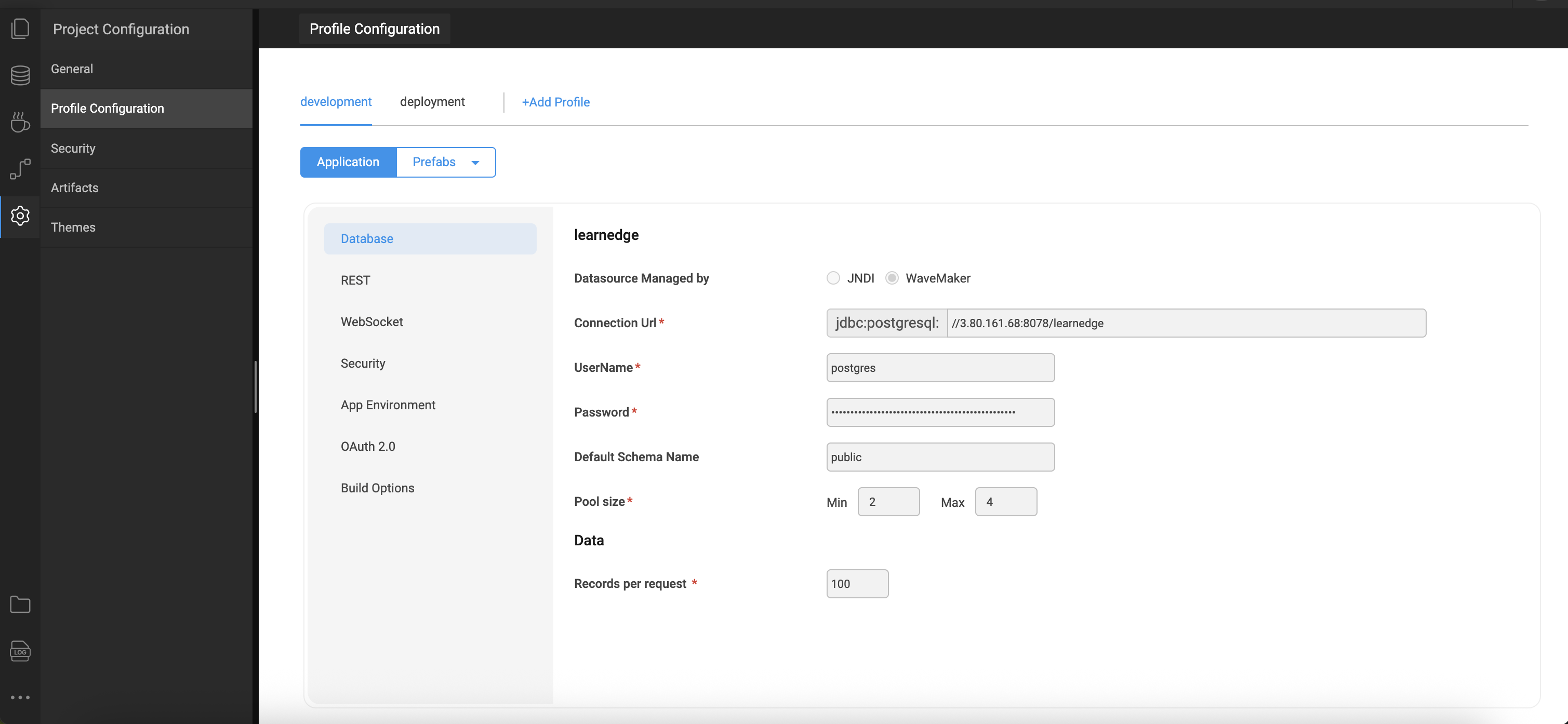
In WaveMaker Studio, environment-specific configurations are managed through Profile Configuration available under Settings. An environment profile represents a logical grouping of configuration values required for a specific runtime environment.
Each profile contains properties such as database connection strings, API endpoint URLs, authentication credentials, and other environment-dependent parameters. These values are defined once and reused across the application, ensuring consistency and easier management.
Once a profile is created and saved, it becomes available within the project configuration. Multiple profiles can coexist in a single project, enabling seamless switching between environments such as Development, QA, and Production without requiring code changes.
To learn more about the configuration settings and their usage, refer to the Profile Settings
Using Configuration Profiles
- When deploying an application, you can select a specific profile to inject its values into the runtime environment.
- All externalizable properties referenced in the application will automatically pick up the values from the selected profile.
- This eliminates the need to modify the application code or rebuild the project for different environments.
Summary
- Consistency: Ensures that the same application behaves consistently across environments.
- Flexibility: Easily switch between different environments without manual code changes.
- Simplified Deployment: Reduces deployment errors by centralizing environment-specific configurations.
- Reusability: Profiles can be reused across multiple applications within the same WaveMaker workspace.
This approach streamlines application deployment and environment management.