Session Persistence – Scaling Applications
Session Persistence defines where and how user session data is stored. Configuring session persistence is essential when enabling horizontal scaling, as it ensures that user sessions remain available across multiple application instances.
Horizontal scaling involves running the application on multiple nodes or servers. Incoming requests are distributed across these nodes, allowing the application to handle higher traffic and more concurrent users. With proper session persistence in place, there is no practical limit to the number of nodes that can serve the same application.
Configuring Session Persistence
The application first connects to the database to support authentication and session storage.
Authentication is then enabled from the Security settings, allowing the application to manage user access.
Next, session handling is configured through Login Configuration, where the application decides how user sessions should be stored.
In the Session Persistence section, one of the following storage options is selected based on the application’s needs:
- In-Memory
- REDIS
- JDBC
- MONGODB
The chosen option is used to maintain user sessions during authentication.
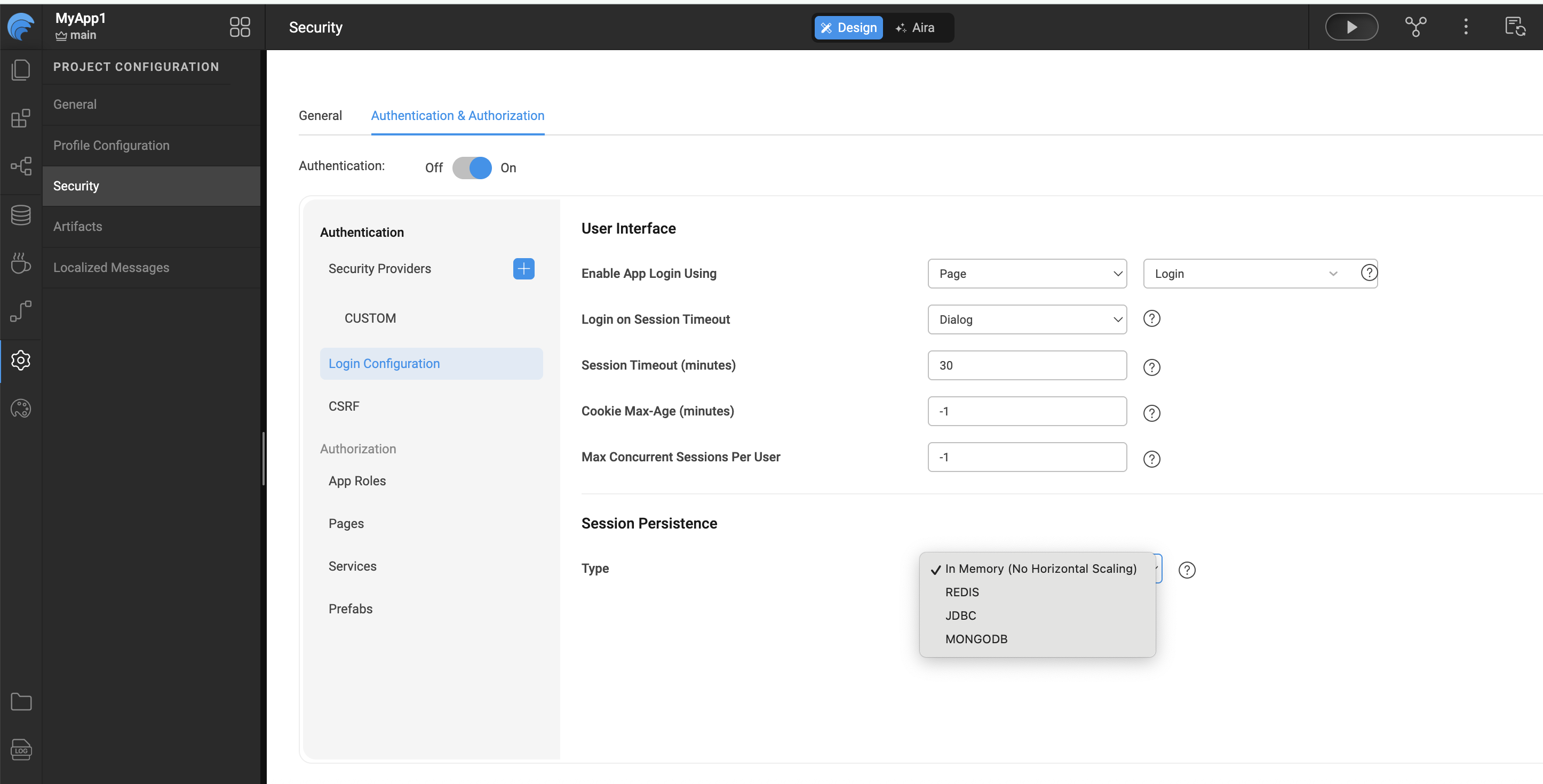
Session Persistence Types
In-Memory
In-Memory is the default option and is suitable for single-node deployments.
Session data is stored locally within the application instance and is not shared across nodes.
REDIS
When REDIS is selected, session data is stored in a centralized Redis cache, making it ideal for horizontally scaled applications.
You must provide the following details:
- Host
- Port
- Password
- Database
For more information, refer to Host, port, password, and database in the Redis documentation
The default Redis database is 0, but this can be changed based on your Redis setup.
JDBC
With JDBC session persistence, user session data is stored in a relational database.
-
The configuration displays a dropdown containing all databases imported into the project.
-
Applications may have multiple active login sessions, and each session—along with its timeout information—is stored in database tables.
Select a database from the dropdown and save the settings to enable JDBC-based session persistence.
The selected database must be in editable mode and not configured as read-only.
MongoDB
MongoDB can also be used to store application session data.
MongoDB session persistence is configured from the Security settings under Session Persistence. When the persistence type is set to MONGODB, the application requires MongoDB connection details such as the database name, host, port, and credentials. Once these details are provided and saved, the application uses MongoDB to store and manage user session data.
WaveMaker automatically imports the required drivers and configuration files, enabling the application to connect to MongoDB seamlessly.
Summary
Session Persistence enables WaveMaker applications to maintain user sessions reliably, especially in horizontally scaled environments. By externalizing session storage, applications can distribute load across multiple nodes without losing session continuity.
WaveMaker supports multiple session persistence strategies—In-Memory, Redis, JDBC, and MongoDB—allowing teams to choose the most appropriate option based on deployment size, scalability requirements, and infrastructure preferences. With built-in configuration and automatic dependency management, WaveMaker simplifies session persistence while ensuring secure and consistent se