Design System Projects
WaveMaker has introduced Design System based projects for building user interfaces in web and mobile applications with a structured way that is token-driven, component-governed, and theme-controlled from the foundation. This approach ensures visual consistency, controlled customization, and long-term maintainability across applications.
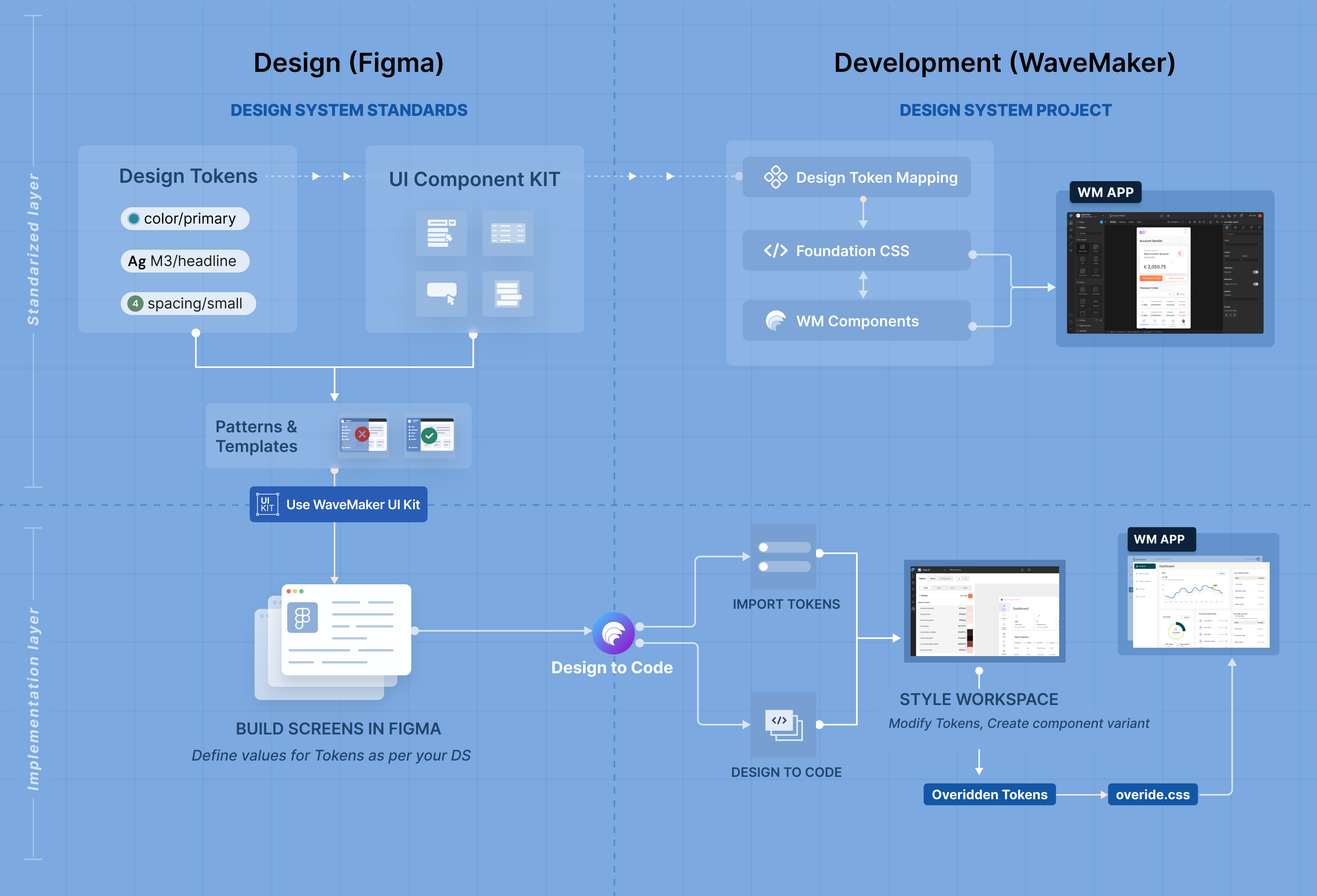
For this WaveMaker has created standard approach for both designers and developers to start with and be productive. WaveMaker provides: Figma UI KIT for designers to implement thier designs, Design System project for helping developers to start building applications with pixel perfect implementation managing these design tokens and components.
Additionally, the Design to Code plugin was introduced to improve productive which can be used to convert Figma designs into live in screens in WaveMaker design system project with layouts, components, and design tokens automatically imported.
What is a Design System Project?
A Design System project in WaveMaker is built on three core pillars:
- Foundation CSS
- WaveMaker Components
- Style Workspace
Together, they create a governed styling architecture where design tokens flow consistently from definition to runtime.
Foundation CSS
Foundation CSS is the styling backbone of a Design System project.
It is built on CSS variables and is responsible for:
- Defining theme tokens (color, typography, spacing, radius, elevation, etc.)
- Enabling runtime theming
- Maintaining consistent application look and feel
- Allowing token-based overrides without breaking structure
All visual properties resolve through CSS variables, ensuring that changes to tokens automatically reflect across the application.
This creates a scalable and future-proof styling layer.
WaveMaker Components
WaveMaker Components in a Design System project are:
- Built to consume Foundation CSS variables
- Fully compatible with token-based styling
- Designed for predictable visual behavior
- Structured for variant support
These components do not rely on hard-coded values.
Instead, they inherit visual definitions from the token system.
This guarantees:
- Consistency across screens
- Alignment with design system standards
- Easier maintenance and upgrades
Style Workspace
The Style Workspace is the control center for managing the Design System within a project.
It enables developers to:
- Modify token values
- Create and manage component variants
- Extend styles safely
- Generate controlled overrides
When customizations are made, WaveMaker generates structured override files (for example, override.css) and overridden token definitions.
This ensures:
- The base system remains intact
- Customizations are isolated
- Future updates remain safe and manageable
How It Works Together
In a Design System project:
- Foundation CSS defines the token structure.
- WaveMaker Components consume these tokens.
- Style Workspace manages token values and variants.
- Overrides are generated in a controlled manner.
- The final application renders consistently across screens.
This architecture separates structure from styling, allowing applications to evolve without compromising design integrity.
Summary
Design System based projects in WaveMaker provide:
- A token-powered Foundation CSS layer
- System-compatible WaveMaker Components
- A Style Workspace for managing tokens and variants
- Structured override generation for safe customization
This approach ensures that applications are not just built — they are built on a governed, scalable design foundation.