Configure SSL Termination in a LoadBalancer
Overview
SSL Termination (also called SSL offloading) is the process of removing SSL-based encryption from incoming HTTPS traffic at the LoadBalancer before forwarding it to your backend Tomcat server. This relieves the application server from the overhead of decryption and certificate management. This guide walks you through configuring Tomcat's RemoteIpValve so your WaveMaker app correctly identifies forwarded HTTPS traffic and responds with secure redirects, cookies, and URLs.
Prerequisites
Before you begin, make sure you have:
- A WaveMaker app deployed and running on a Tomcat server
- A LoadBalancer in front of Tomcat, configured to:
- Terminate SSL and forward plain HTTP to Tomcat
- Add
X-Forwarded-Proto,X-Forwarded-For, andX-Forwarded-Portheaders to every forwarded request
- Root or sudo access to the Tomcat server to edit
server.xml - Access to WaveMaker Studio (required only for the optional header test in the last section)
How SSL Termination Works
In a standard SSL-terminated setup, HTTPS traffic never reaches Tomcat directly. Instead:
-
Clients send HTTPS requests to the LoadBalancer.
-
The LoadBalancer handles the SSL handshake via the Secure Sockets Layer, decrypts the traffic, and forwards plain HTTP to the Tomcat server.
-
Before forwarding, the LoadBalancer injects the following headers so Tomcat can reconstruct the original request context:
Header Value X-Forwarded-ProtohttpsX-Forwarded-ForClient IP address X-Forwarded-Port443 -
Tomcat receives HTTP traffic and passes the request — with those headers — to your WaveMaker app.
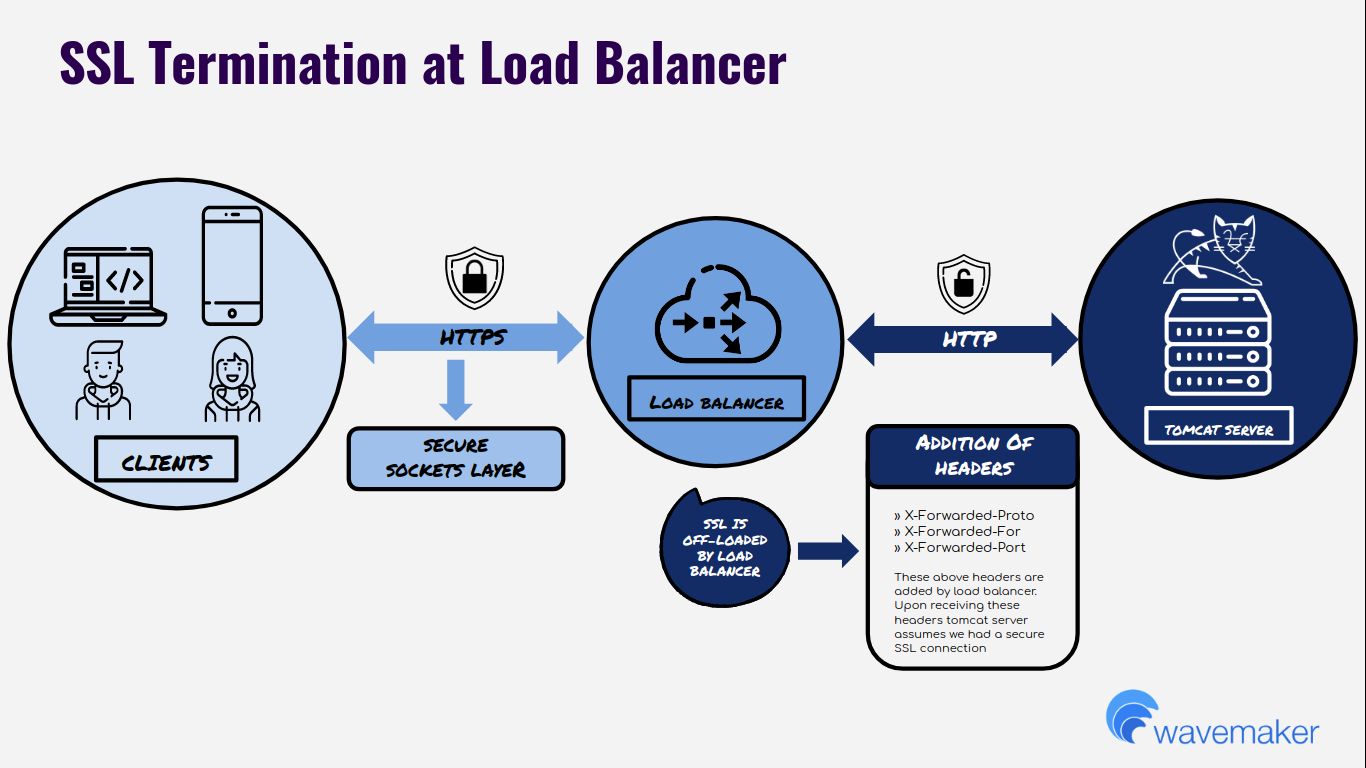
Your WaveMaker app calls request.isSecure() to determine whether a request was made over HTTPS. Without additional configuration, Tomcat ignores the X-Forwarded-* headers, so request.isSecure() returns false for every request — even those that originated as HTTPS. This breaks secure cookie flags, HTTPS redirects, and any other behavior gated on isSecure().
Configuring the RemoteIpValve instructs Tomcat to read and trust those headers, making request.isSecure() return true for HTTPS traffic forwarded through the LoadBalancer.
Configure the Tomcat RemoteIpValve
- SSH into your Tomcat server.
- Open
server.xml. The default path is/usr/local/tomcat/conf/server.xml. - Find the
<Host>block that contains your existing<Valve>entry. - Insert the following snippet above the existing
<Valve>tag:
<Valve className="org.apache.catalina.valves.RemoteIpValve"
  remoteIpHeader="X-Forwarded-For"
  requestAttributesEnabled="true"
  protocolHeader="X-Forwarded-Proto"
  protocolHeaderHttpsValue="https"
  portHeader="X-Forwarded-Port" />
- Save the file.
- Restart Tomcat to apply the change.
protocolHeader is only honored when the request originates from an IP range matching internalProxies. The built-in default covers standard RFC 1918 private ranges. If your LoadBalancer IP falls outside those ranges, follow the next section before restarting.
Configure Custom Internal Proxy IP Ranges (Optional)
By default, Tomcat only trusts X-Forwarded-Proto from requests originating within these IP ranges:
10.x.x.x | 192.168.x.x | 169.254.x.x | 127.x.x.x | 172.16–31.x.x | ::1
If your LoadBalancer sits outside these ranges, Tomcat silently ignores the header and request.isSecure() keeps returning false.
The full default regex value for internalProxies is:
10\.\d{1,3}\.\d{1,3}\.\d{1,3}|192\.168\.\d{1,3}\.\d{1,3}|169\.254\.\d{1,3}\.\d{1,3}|127\.\d{1,3}\.\d{1,3}\.\d{1,3}|172\.1[6-9]{1}\.\d{1,3}\.\d{1,3}|172\.2[0-9]{1}\.\d{1,3}\.\d{1,3}|172\.3[0-1]{1}\.\d{1,3}\.\d{1,3}|0:0:0:0:0:0:0:1|::1
To add your LoadBalancer's IP range:
- Identify the IP range or specific IP of your LoadBalancer.
- Append it to the default regex using
|as a separator. - Set the combined value as the
internalProxiesattribute in the valve:
<Valve className="org.apache.catalina.valves.RemoteIpValve"
  internalProxies="10\.\d{1,3}\.\d{1,3}\.\d{1,3}|<your-lb-ip-range-regex>"
  remoteIpHeader="X-Forwarded-For"
  requestAttributesEnabled="true"
  protocolHeader="X-Forwarded-Proto"
  protocolHeaderHttpsValue="https"
  portHeader="X-Forwarded-Port" />
- Save
server.xmland restart Tomcat.
To match a specific IP like 203.0.113.45, use the regex 203\.0\.113\.45. For a CIDR like 203.0.113.0/24, use 203\.0\.113\.\d{1,3}.
Test the Header Configuration
Use a temporary JSP page to verify that Tomcat is reading the forwarded headers correctly and that request.isSecure() returns true.
Delete this file immediately after testing. Leaving it on the server leaks internal request header information and is a security risk.
- Create a file named
header_test.jspwith the following content:
<%@ page import="java.util.*" %>
<html>
  <head><title>EchoHeaders</title></head>
  <body>
    <h1>HTTP Request Headers Received</h1>
    <h2>Is Secure  : <%= request.isSecure() %></h2>
    <h2>Request URL: <%= request.getRequestURL() %></h2>
    <h2>Request URI: <%= request.getRequestURI() %></h2>
    <h2>Server Name: <%= request.getServerName() %></h2>
    <h2>Server Port: <%= request.getServerPort() %></h2>
    <h2>Remote Addr: <%= request.getRemoteAddr() %></h2>
    <table border="1" cellpadding="4" cellspacing="0">
    <%
      Enumeration eNames = request.getHeaderNames();
      while (eNames.hasMoreElements()) {
        String name = (String) eNames.nextElement();
        String value = normalize(request.getHeader(name));
    %>
      <tr><td><%= name %></td><td><%= value %></td></tr>
    <%
      }
    %>
    </table>
  </body>
</html>
<%!
  private String normalize(String value) {
    StringBuffer sb = new StringBuffer();
    for (int i = 0; i < value.length(); i++) {
      char c = value.charAt(i);
      sb.append(c);
      if (c == ';') sb.append(" ");
    }
    return sb.toString();
  }
%>
- In WaveMaker Studio, upload
header_test.jspto thesrc/main/webapp/resourcesdirectory using the Studio Upload File UI. - Access the test page from a browser through the LoadBalancer (not directly via Tomcat):
https://<your-app-domain>/<app-name>/resources/header_test.jsp - Verify the following in the output:
- Is Secure shows
true x-forwarded-protoheader showshttpsx-forwarded-forheader shows the client IP
- Is Secure shows
- Delete
header_test.jspfrom the server immediately after verification.
Troubleshooting
request.isSecure() still returns false after restarting Tomcat
Check each of the following in order:
| Symptom | Likely cause | Fix |
|---|---|---|
x-forwarded-proto header missing from test page output | LoadBalancer is not injecting headers | Configure header injection on the LoadBalancer side |
x-forwarded-proto is present but Is Secure is still false | LoadBalancer IP is outside internalProxies range | Add the LoadBalancer IP to internalProxies as described above |
Headers present, Is Secure is true in the test page, but app still misbehaves | App-level cache or redirect loop | Clear browser cache; check for HTTP → HTTPS redirect misconfiguration in the app |
| Tomcat did not pick up the change | server.xml edit was applied to the wrong file or Tomcat was not fully restarted | Confirm the valve is in the correct <Host> block and run a full stop/start, not a reload |
Limitations and Constraints
| Constraint | Details |
|---|---|
| Trusted network only | The RemoteIpValve trusts the X-Forwarded-* headers from matching IPs. Never add public IP ranges to internalProxies — any host in that range can spoof the X-Forwarded-Proto header. |
| Applies to Tomcat only | This guide covers Tomcat. Other WaveMaker-supported servers (e.g., JBoss, WebLogic) require equivalent configuration specific to their proxy valve or filter. |
| HTTP direct access | Requests hitting Tomcat directly (bypassing the LoadBalancer) will still appear as HTTP. Ensure your network rules block direct Tomcat access from the internet. |