Styling Architecture
In a Design System project, styling in WaveMaker follows a structured, token-driven architecture. The system ensures consistency, controlled customization, and safe extensibility.
Styling Flow Overview
Styling in a Design System project is structured into distinct layers that build upon each other to create the final visual output of the application. Each layer serves a specific purpose in the styling architecture, allowing for a clear separation of concerns and enabling both consistency and flexibility in design.
Below are the key layers in the styling flow:
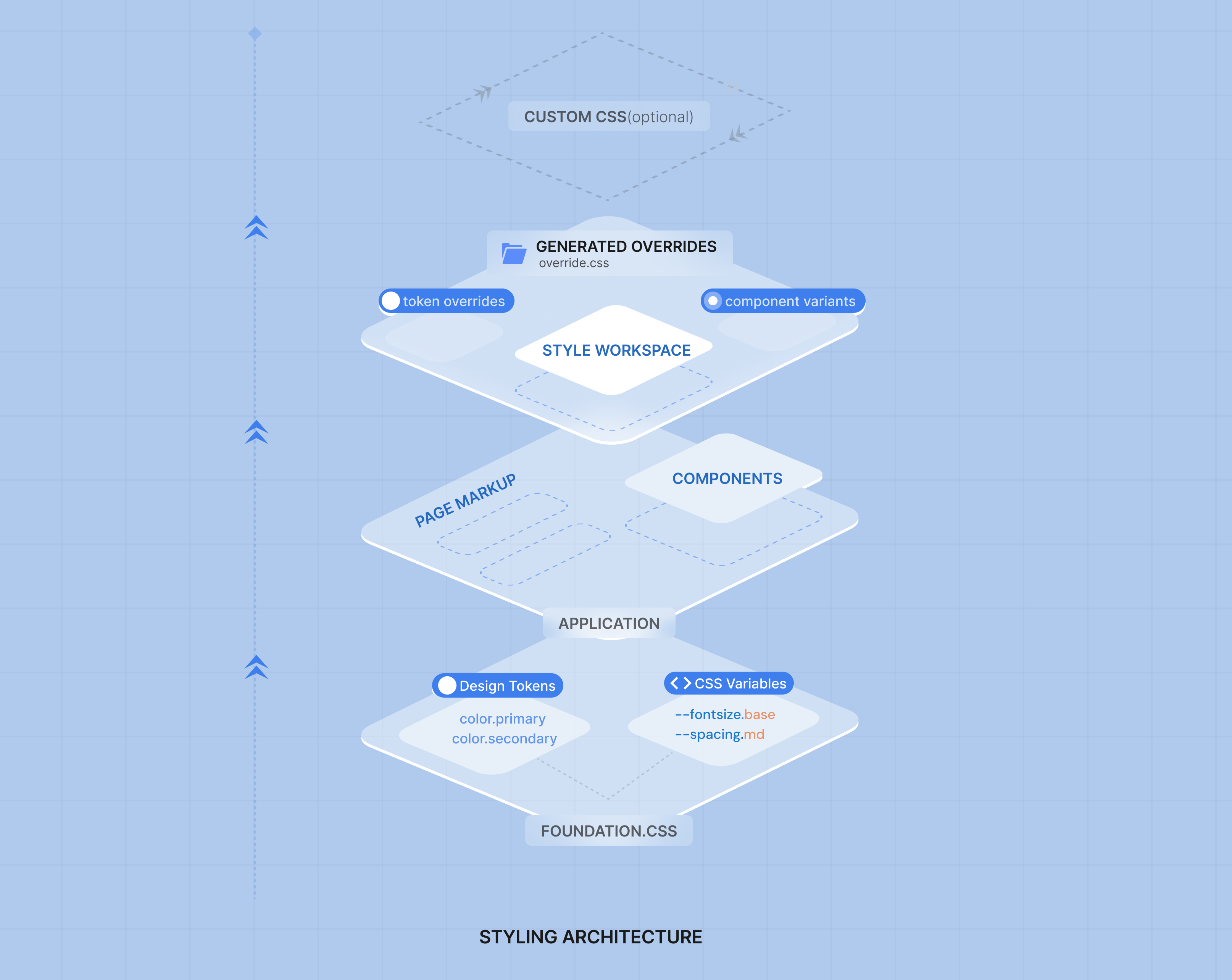
Layer 1 — Foundation.css
Foundation.css is the core styling layer of the application.
It contains pure CSS definitions built on CSS variables and system classes that control how the application renders visually.
This layer is responsible for:
Design Tokens
Defines foundational design decisions such as:
- Colors
- Typography scale
- Spacing
- Border radius
- Elevation and shadows
- Surfaces and backgrounds
CSS Variables
Design tokens are exposed as CSS variables so they can be consumed consistently across the platform at runtime.
Token → Variable Mapping
External or predefined tokens are mapped to platform CSS variables, ensuring:
- Standardized naming
- System consumption
- No hard-coded styling
Foundation.css acts as the single visual source of truth and remains untouched by customizations, ensuring upgrade safety.
Layer 2 — Components
The Components layer consumes Foundation.css.
WaveMaker components:
- Adhere to Foundation CSS via predefined CSS classes
- Avoid hard-coded styling values
- Resolve styling using CSS variables
- Maintain consistent behavior across pages
Because components depend on the foundation layer, token changes automatically propagate across the application.
This ensures:
- Uniform UI
- Predictable styling behavior
- Scalable design updates
Layer 3 — Style Workspace & Overrides
The Style Workspace is the customization and extension layer.
It enables developers and designers to:
- Override design token values
- Create component variants (CSS classes)
- Extend styling safely without modifying Foundation.css
When changes are made:
- Token overrides are tracked
- Variant classes are generated
- A structured override.css file is created to apply these changes
This creates a clear separation between system styles and project customization.
Custom CSS (Optional — Last Mile)
If styling cannot be achieved through tokens or variants, users can add custom CSS.
This provides last-mile flexibility while preserving the recommended approach:
- Token-driven styling first
- Variant-driven styling second
- Custom CSS only when necessary
Summary
The styling architecture is structured into clear layers:
- Foundation.css — Design tokens, CSS variables, token mapping (source of truth)
- Components — Consume foundation via CSS classes
- Style Workspace — Overrides tokens and generates variants + override.css
- Custom CSS — Optional last-mile flexibility
This layered approach ensures styling that is consistent, maintainable, upgrade-safe, and enterprise-ready.